
Why this matters for your courses
Starting summer 2026, BYU-Idaho is bringing Canvas in line with its academic data retention policy. Course shells more than a year past their teaching term will be deleted in four phases. The good news: there's a clear way to keep your content safe, and it makes every future semester easier to prepare. Here's what's in it for you.
Your content stays safe and organized
Your modules, assignments, pages, and files live in one persistent home. No more digging through years of old course shells to find your best version.
Semester prep becomes a quick copy
Start each term from your Course Master instead of rebuilding. Improvements you make accumulate in one place, so your course gets better over time.
A faster Canvas for you and your students
Removing tens of thousands of old course shells restores speed and reliability, and brings BYU-Idaho in line with its academic data retention policy.
When this affects your courses
Deletion happens in four phases through summer 2027. Older shells go first. Phase 1 covers BYU-Pathway courses (managed separately). Phases 2 through 4 apply to face-to-face campus courses.
Find my phase
When was your course last taught? We'll show you which phase applies.
How to choose your path
Three ways your course can fit the new policy. Each option works for different situations. Most face-to-face courses will use the Campus Master. Read the details below.
Campus Master
Recommended for most courses
The FTC creates a persistent Campus Master for you. The new default for most face-to-face faculty.
Read more ↓ Option BBlueprints
For multi-section courses
Adds a Blueprint layer so one update syncs to every section of a course at once.
Read more ↓ Option CTraditional
Limited use
Keep copying from the previous semester. Familiar, but your content is at risk if you take a break from teaching.
Read more ↓Campus Master
RECOMMENDEDRecommended for most face-to-face faculty. The new default.
What this looks like
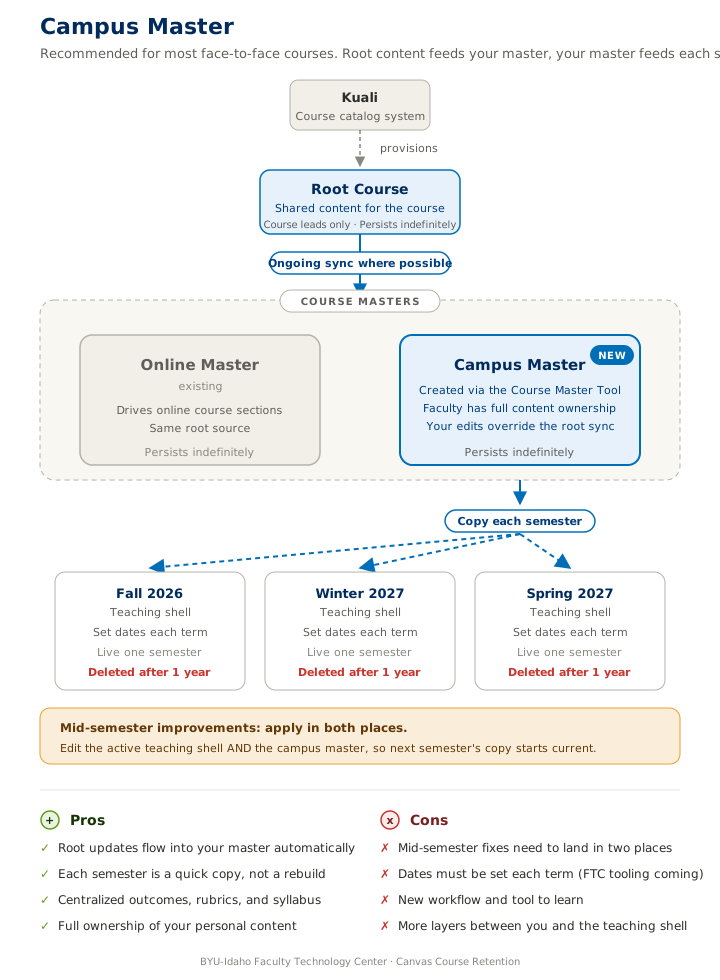
The FTC creates a Campus Master for you using the Course Master Tool. The master holds your canonical course content and persists indefinitely. Each semester, you copy from your master into the new teaching shell and set the dates. Root course content (outcomes, rubrics, shared materials) syncs into your master automatically.
Who this is for
The recommended path for most face-to-face courses. It protects your content from the one-year deletion cycle and makes semester prep a quick copy rather than a rebuild. Especially valuable if you teach intermittently or anticipate a break.
What's required of you
- Fill out the Google Form to join the FTC waitlist
- Provide your course details (title, code, BYU-Idaho username)
- Populate your master with course content once it's set up
- Each semester, copy from your master into the new teaching shell
- Set dates each term (FTC tooling in development to help with this)
- For mid-semester improvements, edit both the active shell and the master
What the FTC handles
- Creating your Campus Master using the naming convention
- Copying content from existing course shells if applicable
- Future self-service tooling via the Course Master Tool (coming soon)
- Walkthroughs, questions, and special situations
Blueprints
For large multi-section courses. Where consistency across sections matters.
What this looks like
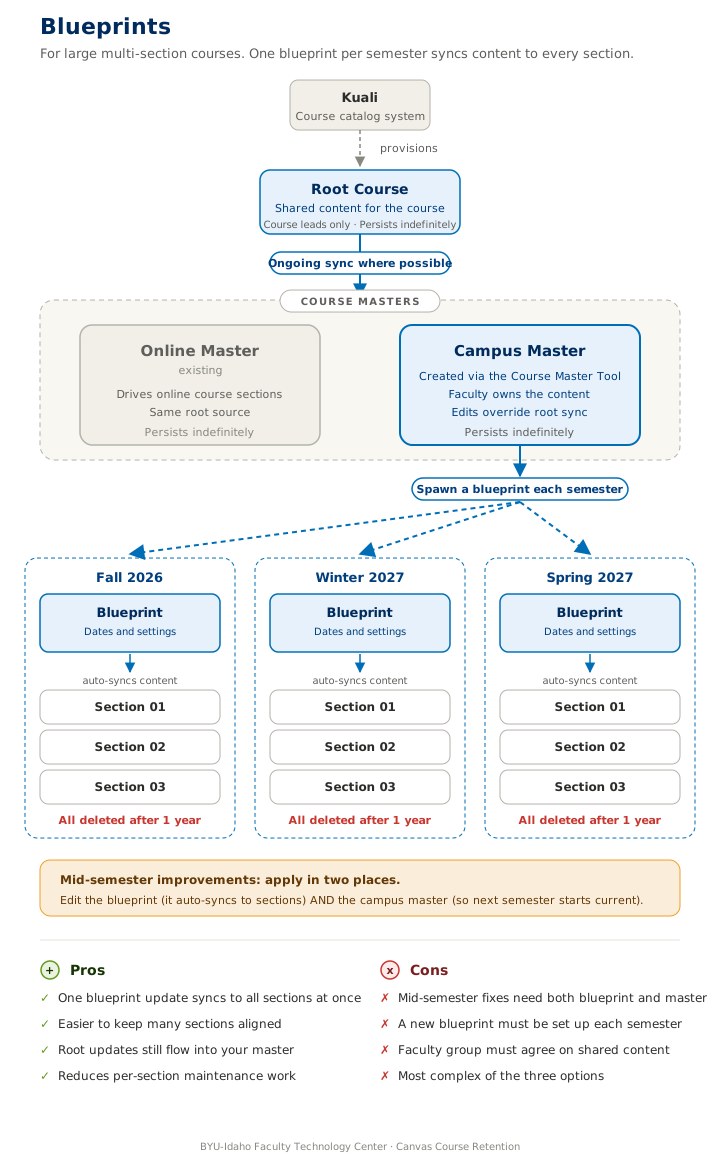
Same upstream as the Campus Master (Kuali to Root Course to Campus Master), with an extra layer added. Each semester, the Campus Master spawns a Blueprint course. The Blueprint holds the dates and settings for that term and pushes content to every section of the course at once. Update the Blueprint, and every section gets the change.
Who this is for
Blueprints make sense for high-enrollment, multi-section courses where consistency across sections matters and the faculty group has agreed on what's centralized. Most courses don't need this extra layer.
What's required of you
- Fill out the Google Form and mention you'd like a Blueprint
- Coordinate with your faculty group on what's centralized
- Each semester, work with the FTC to spawn a Blueprint from your Campus Master
- Set dates and settings in the Blueprint (these flow to all sections)
- For mid-semester improvements, edit the Blueprint AND the Campus Master
What the FTC handles
- Creating your Campus Master (same as Option A)
- Spawning the Blueprint each semester
- Linking sections to the Blueprint
- Coordinating with your faculty group on what's shared
Traditional
Familiar, but carries risk. Best only if you teach the course every year without interruption.
What this looks like
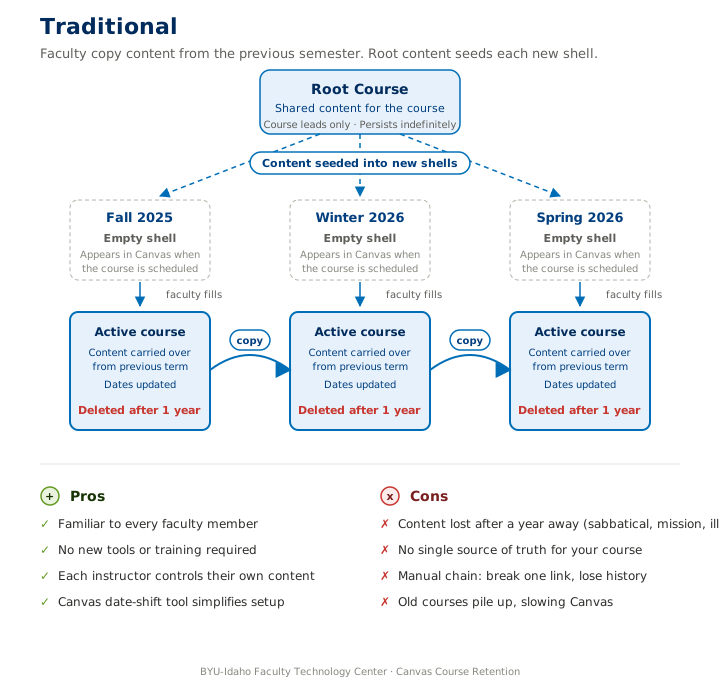
Each semester, an empty Canvas shell appears when your course is scheduled. You copy content from your previous semester into the new shell and shift the dates to match. The shell stays for one year, and then it's deleted. Your "best version" of the course lives only in the most recent shell.
Who this is for
This path works if you teach the same course every semester without interruption. It carries real risk: if you're away from teaching for more than a year (sabbatical, mission, illness, extended leave), your course content is deleted along with the last shell that held it.
What's required of you
- Nothing different from what you do today
- Be aware that any gap longer than 12 months means content loss
- Download your gradebook and submissions manually if you need to keep records
What the FTC handles
- The retention policy itself
- Helping you recover content from old shells (case by case, while they still exist)
Common questions
Answers below are drafted by the FTC based on the policy and current Canvas behavior. If you don't see your question, reach out and we'll add it.
Your contentWill I lose my course design and materials forever?
No, your work is safe when it lives in a Course Master. Anything you move into a Course Master stays with you and is protected from the one-year retention rhythm. We recommend setting one up for every course you teach, even if you don't teach it every semester.
Your contentWhat happens to my old gradebooks and student work?
Past student work is retained for one year after the course ends, in line with BYU-Idaho's academic data retention policy. After that window, the course shell holding those records is deleted. Accreditation records are handled by the Registrar's office.
If you want to keep grades or submissions beyond the one-year window, you can download the gradebook and individual submissions from Canvas. It's a manual process, one assignment at a time, so plan ahead for any course where you want to keep records.
Your contentCan I export my course before it's deleted?
Yes. Canvas lets you export a course as an .imscc file (which you can re-import later) or as a printable HTML or PDF for reference. The FTC also recommends moving everything you want to keep into a Course Master well before the deadline. Your master is the long-term home for your work. If you'd like a walkthrough, request help and we'll schedule a session.
How-toHow is a Course Master different from a regular Canvas course?
A regular Canvas course is tied to a specific semester and section. After student work is finished and the one-year retention window passes, that course shell is deleted. A Course Master is your persistent course shell. It holds the canonical content (modules, assignments, pages, files) and is not affected by the retention timeline. Each semester you copy content from your Course Master into a fresh section to teach from.
How-toWhat if I taught a course years ago and want to teach it again?
Reach out to the FTC. We'll look at your specific situation case by case and figure out what data is still accessible. The earlier you contact us, the more options we typically have. If the old course shell is still around, we can usually recover content into a new Course Master before the relevant phase deadline.
How-toWho can see or use my Course Master?
You as the instructor. BYU-Idaho employees with administrative Canvas access can technically see it, but they generally won't unless you've asked for help. If you want to share your master with a colleague (a co-teacher, a new instructor inheriting the course, or a department peer), the FTC can help set that up.
How-toCan I create a Course Master myself?
Not at the moment. Creating new course shells in Canvas requires elevated permissions that aren't typically granted to instructors. A self-service tool is coming July 1, 2026. Until then, join the FTC waitlist and we'll handle the setup for you.
How-toWho creates Blueprints?
The FTC sets up Blueprints, the same way Course Masters are created today. The upcoming self-service tool will let faculty request both. If you think a Blueprint might help your multi-section course, mention it on the waitlist request and we'll work with you on the right setup.
How-toDo Blueprints expire?
Yes. Each semester gets a fresh Blueprint that's copied from your Course Master, and it's deleted with the rest of that semester's data after one year. Your Course Master itself stays in Canvas indefinitely, so your canonical content is always safe.
Special casesDoes this apply to courses I co-taught with someone else?
Yes, and it's a great chance to coordinate. We recommend deciding together who owns the Course Master and whether shared content should live in one place or in separate masters for each instructor. The FTC can join a planning conversation if helpful.
Special casesWhat about courses with third-party content (Pearson, McGraw-Hill, etc.)?
It depends on whether BYU-Idaho manages the tool. For university-managed integrations (where BYU-Idaho has a centralized contract and admin control), the one-year retention policy applies the same way. Those course shells will be deleted on schedule.
For courses that rely on tools BYU-Idaho doesn't manage or can't enforce the policy on, the course shells will persist in Canvas indefinitely. If you're not sure which bucket your tool falls into, mention it on the waitlist request and the FTC will check.
Special casesCan I get an exception or extension?
No. There are no exceptions to the retention policy at this time. The timeline is firm, but the FTC is here to help you transition before your phase deadline. Joining the waitlist early gives us the most time to work with your content.
Special casesWhat if I'm no longer at BYU-Idaho when my course's phase arrives?
The course will be deleted along with your account access. After you depart, you no longer have rights to download or access university data, so plan ahead. While you're still employed, the FTC is happy to help you export anything personal you want to keep before your last day.
PolicyI teach online. Does this apply to me?
The retention policy applies to all Canvas courses at BYU-Idaho. Online courses already use the Course Master and Blueprint model, so they aren't affected by this transition. This page is focused on face-to-face campus faculty. If you teach online and have any questions or concerns about the policy, please contact the FTC directly.
PolicyWho do I contact if I have questions this page doesn't answer?
The Faculty Technology Center is here for exactly that. Email ftc@byui.edu, call (208) 496-7230, or stop by Manwaring 384. We're open Monday through Friday, 7 AM to 7 PM.
Talk to the FTC
We're glad to help. Whether you want a working session, a quick question answered, or a sounding board on what approach fits your course, we're here.