ECEN 106 Week 02.1 Lab Intro: Arduino Setup Lab
Lab Overview:
During the Arduino Setup Lab, you will install the Arduino IDE on your laptop. The Arduino IDE allows you to send code from your laptop to your Arduino. Then, you will use buttons, an LED, and a buzzer as I/O devices.
One of the goals of this lab is to experience a simple, but complete, Computer System. You will send code to the Arduino's flash storage.
Then, whenever the Arduino starts up, it will begin executing that code with its CPU while interacting with its RAM (Memory) which will hold temporary values, like the variables in the code.
The code will process incoming signals from the input devices (the buttons) and send outgoing signals to the output devices (the LED and buzzer).
Prepare for the Arduino Setup Lab:
-
Find your lab kit that you purchased from the bookstore. If you haven't yet purchased a kit from the Bookstore, you need to ASAP. Talk with your instructor if you have any difficulty getting a kit.
-
Check your USB ports.
-
There is an Arduino in your lab kit. It will
connect to your computer with the blue USB cord.
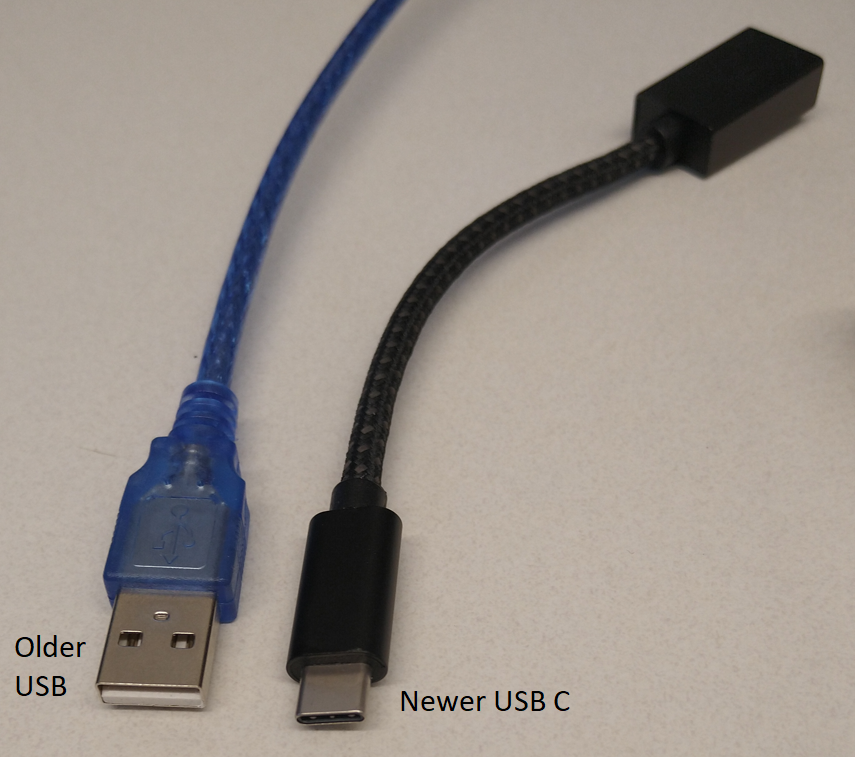
That cord requires the traditional USB ports
(not the newer USB-C ports).
-
If your laptop only has the newer USB C ports,
you will need to use an adapter (see image at the bottom of this page).
-
If you do not have an adapter and need one,
you will need to purchase one to use before you will be
able to complete this lab.
-
Click here to watch
How to Use a Breadboard (12 min)
Arduino Setup Lab Instructions:
-
When you are ready to begin the lab, click
this link to access the lab instructions for the Arduino Setup Lab.
-
Please be aware: If you are on campus while attempting Part 2, sometimes
the BYU-I Wi-Fi blocks the Arduino driver updates, so
if you complete Steps 1 and 2 at home before going on campus, it will
decrease the chance of having issues with the remaining
steps. If you have any issues with Part 2, please post in
the W02 support forum or contact your instructor.
-
After completing the lab, return to I-Learn and complete the Lab Report assignment for this lab.
Help with the Lab:
- Post in the W02 Support Forum or contact your instructor.
- Video: If you need more assistance, follow along with this video walkthrough of the lab.